

Appearance
Understanding Workflows
A workflow in PICMI is the structured series of steps that a person follows to complete an application for either employment or service agreements. Workflows guide participants through all necessary information collection, declarations, and documentation before presenting them with an agreement.
note
Once you understand what a workflow is, you need to understand how PICMI builds workflows through reusing and combining the building blocks of underlying items.
What is a workflow?
Workflows are the backbone of PICMI's application process. They ensure that:
- All required information is collected consistently
- Participants understand the opportunity, organisation, and expectations
- Compliance requirements are met before agreements are issued
- The process is fair, legal, and inclusive for everyone
note
Workflows sit between the opportunity and the agreement in PICMI's structure: Organisation → Opportunity → Workflow → Agreement
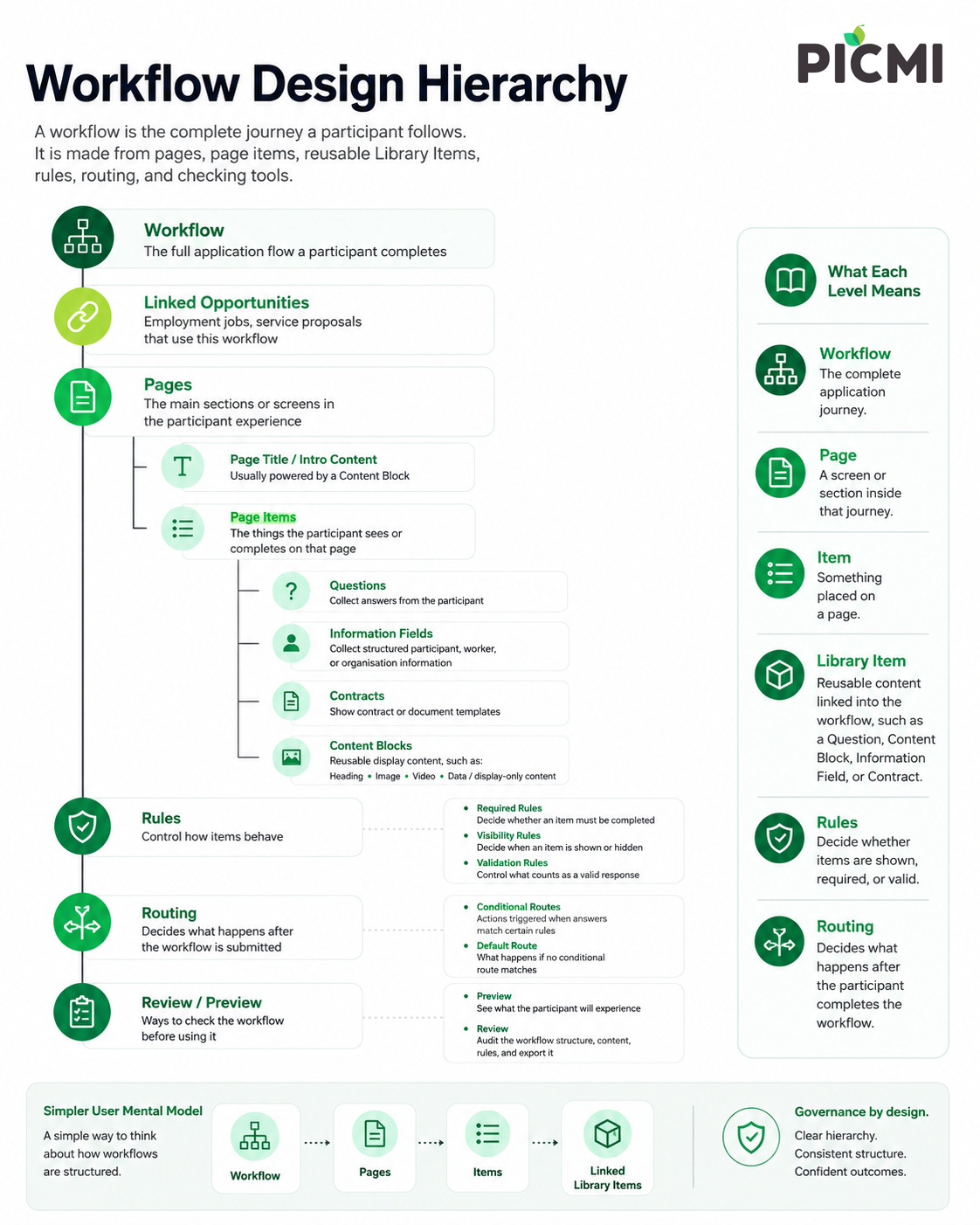
Workflow structure: Pages and items
Every workflow is organised into pages, and each page contains items that participants interact with or review.
note
PICMI has industry-standard workflows that have been tested and approved by the PICMI team ready for you to use. They are built to be flexible and easy to adapt to your organisation's needs. PICMI finds most organisations may adjust 3-5 items to suit their needs.
Pages
Pages group related content together to make the application process manageable and logical. Common page names include:
- Check Your Fit
- Personal Information
- Health & Safety
- Right to Work
- Certifications
- Agreement
Items
Each page contains items that serve different purposes:
| Item Type | Purpose |
|---|---|
| Questions | Collect information from participants (text, dates, files, choices, declarations) |
| Information | Known fields or details about the participant, organisation, or opportunity |
| Heading | Break up content with titles and explanatory text |
| Image | Show visual content like photos or diagrams |
| Video | Embed video content to explain roles or environments |
| Data | Show structured reusable information |
| Contract | Embed contract template |
note
Items appear in the order you configure them within each page. Thoughtful ordering improves completion rates.
Workflow Builder
Manage workflows from Setup > Workflows. Opening a workflow takes you to the Workflow Builder.
The Workflow Builder has three modes:
| Mode | Use it to |
|---|---|
| Preview | Check the participant experience across desktop, tablet, and mobile frame sizes |
| Edit | Change workflow pages, item placement, Library Items, required state, visibility, and linked details |
| Review | Audit workflow contents in a searchable table and export the review data |
Preview mode is for checking what participants will see. Review mode is for checking the workflow structure and item details as a business user. A Review outcome in routing is different again: it means a participant answer needs human review before the workflow can continue.
Employment workflows vs Service workflows
PICMI supports two main types of workflows, each designed for different relationship types:
Employment workflows
Employment workflows are used when hiring employees under an employment agreement. These workflows typically collect:
- Personal information and contact details
- Right to work verification
- Tax and superannuation information
- Bank account details
- Health and safety acknowledgments
- Role-specific declarations
Employment workflows may differ based on employment type:
Casual employment
- Often includes availability questions
- May collect information about seasonal work patterns
- Typically asks about flexibility and shift preferences
- Holiday pay arrangements (pay-as-you-go vs accrual)
Fixed-term employment
- Includes specific start and end dates
- May require reason for fixed-term arrangement
- Often collects project-specific information
- End-of-contract provisions
Permanent employment
- Streamlined compared to casual workflows
- Less focus on induction (completed after starting)
- Reduced Check Your Fit sections
- Focus on long-term role suitability
- Salary rather than hourly rate information
note
Key difference: Permanent workflows typically require less information than casual or fixed-term workflows because they assume long-term commitment and post-start induction.
Service workflows
Service workflows are used when engaging contractors or service providers under service agreements rather than employment contracts. These workflows:
- Focus on business-to-business relationships
- Collect company and certification information
- Verify compliance documents (insurance, health & safety systems)
- May include subcontractor details
- Define service scope and deliverables
Service workflows may differ based on contractor type:
Service provider (contractor)
- Business details and registration
- Insurance and liability coverage
- Health and safety management systems
- Certification compliance (e.g., GAP, SiteWise, GRASP)
- Service rates and payment terms
- Worksite information and requirements
Subcontractor
- Similar to contractor workflows
- Additional accountability tracking
- Connection to primary contractor
- Host business needs visibility of all workers on-site
note
Service agreements are fundamentally different from employment agreements—they establish business-to-business relationships rather than employer-employee relationships.
Common elements across all workflows
Regardless of type, all workflows share certain elements:
Contracts
Every workflow includes a contract that:
- Uses field substitutions (chips) to dynamically insert data
- Pulls information from organisation details, job details, workflow answers, and personal overrides
- Cannot conditionally include/exclude entire sections (only substitute specific values)
Library Items
Reusable cross-workflow items are managed through the Library. Library Items can include:
- Questions
- Information
- Content Blocks
- Contracts
When a Library Item is used in a workflow, the workflow controls where it appears. The Library Item controls the wording, content, template, answer type, validation, and other reusable details.
Library Items can be:
- used across multiple workflows
- updated once when the same change should apply everywhere
- filtered by type, hidden status, or usage
Personal overrides
Allow specific adjustments for individual circumstances:
- Variations in pay rates
- Modified job descriptions
- Special conditions or arrangements
Workflow examples
Employment workflow: Orchard – Casual
- Contact Information (personal details, phone, email)
- Right to Work (visa status, work rights verification)
- Check Your Fit (availability, experience, physical requirements)
- Health & Safety (site safety rules, PPE requirements)
- Induction (site-specific training materials)
- Tax & Pay (IRD number, KiwiSaver, bank account)
- Contract (casual employment agreement)
Employment workflow: Office – Permanent
- Contact Information
- Right to Work
- Background (qualifications, references)
- Tax & Pay
- Contract (permanent employment agreement)
Note: Shorter than casual workflow—no induction questions, simplified Check Your Fit
Service workflow: Kiwifruit Services Agreement
- Contact Information (grower and contractor details)
- Profile & Services (orchard details, services required)
- Worksite (site information, documents, maps)
- Subcontractors (list of any subcontractors)
- Certifications (CAV, GAP, SiteWise, GRASP compliance)
- Pay Rates (service charges and worker pay rates)
- GRASP (social practice standards)
- GLOBALG.A.P. (food safety and sustainability)
- Contract (services agreement)
Workflow reuse and duplication
Workflows are designed to be reusable:
- One workflow can be used across multiple jobs
- Duplicate workflows when you need variations (e.g., different contracts for the same role)
- Changes to shared questions affect all workflows using them
note
When making significant changes, duplicate the workflow first rather than editing a live one to avoid disrupting active applications.
Best practices
- Keep workflows concise: Only ask for information you truly need
- Group related items: Place similar questions on the same page
- Use clear section headings: Help participants understand what's required
- Test the participant experience: Complete the workflow yourself to identify friction points
- Remove unnecessary content: Especially when creating permanent workflows from casual templates
- Link external files properly: Use permanent links (Google Drive version control recommended)