Appearance
Understanding Jobs, Roles, Contracts, and Applications in PICMI
When using PICMI, some terms mean something slightly different from everyday workplace language.
For example, someone might say "change their role" or "put them on another contract", but PICMI needs to know whether this means:
- a new job
- a change in pay or conditions
- or simply updating an agreement
note
This guide explains PICMI terms and the correct action to take.
Terminology Translation Table (Core Reference)
Use this table to translate common workplace language into PICMI concepts.
| What you might mean | Words often used | PICMI term | What it means in PICMI | Example |
|---|---|---|---|---|
| Type of work someone does | Role, Position, Contract | Job | A defined job type in PICMI with its own defaults (conditions) including workflow with contract template | Packer, Packer |
| A person's record/profile | Employee record, Staff profile, Worker, Jobseeker | Person or Participant | The person's profile in PICMI; can have multiple applications over time | Maria Smith |
| Starting someone in a job | Hire, Onboard, Sign up | Application (accepted) | The worker accepts a specific job; this creates the active employment arrangement for that job | Maria accepts Packer |
| The legal paperwork | Contract, Agreement, Employment Agreement | Contract | The legal agreement document generated from an accepted application | Casual employment agreement |
| The contract blueprint to be completed | Contract, Agreement, Employment Agreement | Contract Template | The legal agreement document before it is completed with the individual details (substitution fields) | Casual employment agreement |
| Moving to different work | Role change, New role | New job → New application | If the job changes, PICMI treats it as a new employment arrangement | Picker → Packer |
| Default pay for the work | Rate for the role | Job's Pay Rate | Default pay/terms for anyone doing that job | Packers $24/hr |
| Special pay for one person | Different rate | Personal conditions → Pay Rate | Overrides job defaults for a specific person's application | Sarah $26/hr on same job |
| Changing terms (same work) | Update contract, change rates, update pay | Reissue application | Regenerate the contract (employment agreement) for the same job/application after changing conditions/dates | Pay rise, date update |
| Work period | Contract dates | Application dates | Start/end dates attached to the application (either via job or personal overrides) | 1 Mar – 30 Jun |
How PICMI Organises Employment
PICMI uses a simple structure:
Person → Applications → Jobs
A person can have multiple applications over time (e.g., seasonal roles), and each application is tied to a job.
Example timeline:
- Maria accepts Picker (Jan–Feb)
- Maria accepts Packer (Feb–Apr)
- Maria accepts Grader (May–Jun)
When Do You Need a New Application?
A new application is required when the job changes.
Typical examples:
- Picker → Packer
- Orchard work → Supervisor
- Any change that represents a different type of work arrangement (as set up in your PICMI jobs)
Rule of thumb: If you describe it as "they're doing a different job now", it's a new job → new application.
When Can You Just Update and Reissue the Agreement?
You usually do not need a new application if the worker is still doing the same job, but their conditions change.
Common examples:
- Pay rate changes
- Date changes (start/end)
- Minor condition changes
In this case:
- Update the job conditions (for everyone) or personal conditions (for one worker)
- Reissue the application
Pay Rates in PICMI
Pay rates can be set in two places:
1) Job start and end dates (default for the job)
Use this when most workers in the job share the same rate.
Example:
- All Packers = $30/hr
2) Personal conditions (override for an individual)
Use this when one worker needs different conditions from the job default.
Example:
- Packers default = $30/hr
- Sarah (Packer) = $32/hr via personal conditions
Jobs Are Bound to Date Ranges
In PICMI, jobs are tied to a specific date range.
Even if the type of work is the same, each work period is treated as a separate job.
This is important because PICMI tracks:
- employment agreements
- worker applications
- reporting
- seasonal work periods
against the specific job and its dates.
Because of this, a worker cannot apply to the same job twice once their application is complete.
Instead, a new job must be created for the new work period.
Example: Seasonal Work
Many packhouses repeat the same type of work each year, but each season is still a new job period in PICMI.
Example:
| Worker | Job | Dates |
|---|---|---|
| John Callagher | Packer | 2024 Season |
| John Callagher | Packer | 2025 Season |
Even though John is doing the same activity (packing), these are two separate jobs in PICMI because they occur in different date ranges.
Why PICMI Works This Way
PICMI separates jobs by date range so that it can correctly track:
- which agreement applied at that time
- seasonal employment periods
- historical reporting
- compliance records
- pay and conditions at the time of employment
This ensures each work period has a clear employment record.
Recommended Practice
Most customers create a new job each season and include the date or season in the job name.
Example job names:
| Job Name |
|---|
| Avocado Packer – 2025 Season |
| Avocado Packer – Mar–Jun 2025 |
| Kiwifruit Packer – 2025 |
This makes it easier to:
- track historical work
- avoid duplicate application errors
- manage seasonal employment.
How to Start a New Work Period
If workers are returning to do the same job again, the easiest approach is:
- Duplicate the existing job
- Update the job date range
- Update the job name (optional but recommended)
- Issue new invitations for that job
This creates a new job period while keeping the same conditions and setup.
Common Error: "User application is already complete"
You may see this message when inviting a worker to a job they have already completed.
Example scenario:
- Worker previously worked on Packer – 2024 Season
- Their application is marked complete
- You attempt to invite them again to the same job
PICMI prevents this because applications cannot be duplicated on the same job once completed.
How to fix it
Create a new job with the new date range, then invite the worker to that job.
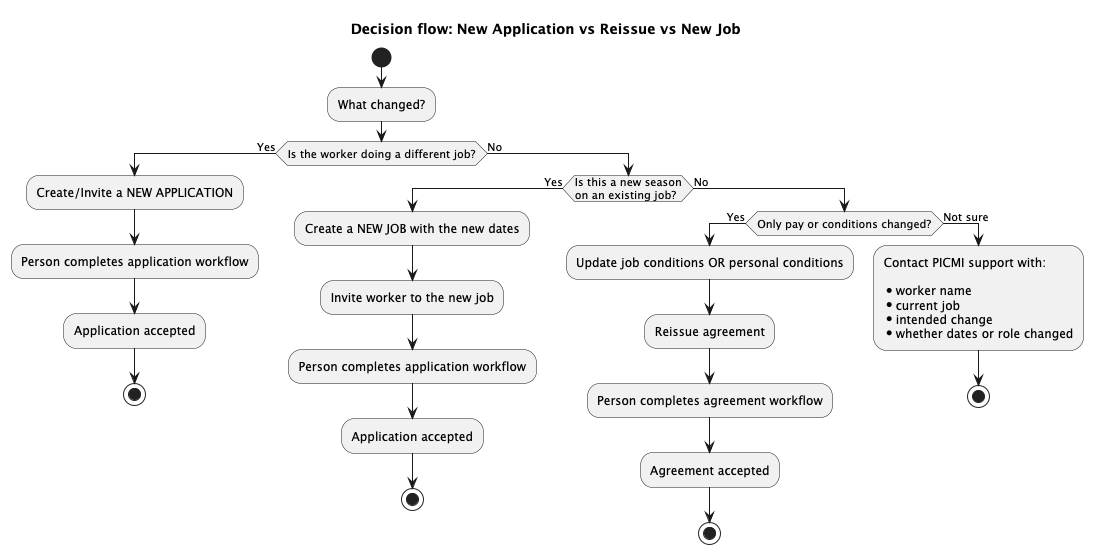
Quick Summary
| Scenario | What to do in PICMI |
|---|---|
| Worker changes to a different job | Create/accept a new application |
| Worker returns to the same type of work in a new season or date range | Create a new job with the new dates, then invite them to that job |
| Worker stays in the same job but rate changes | Update conditions and reissue the agreement |
| Rate changes for everyone in that job | Update the job conditions and reissue agreements as needed |
| Rate changes for one worker only | Update personal conditions and reissue the agreement |
| Worker cannot be invited because "user application is already complete" | Create a new job for the new date range and invite them to that job |
Decision-making process