

Appearance
Kiwifruit: Orchard Profile Information and Services Required
This section outlines how to record the layout, key details, and service needs of your orchard. Completing this information accurately helps ensure better workforce planning, efficient service delivery, and compliance alignment for both growers and contractors.
note
Much of this information is already in Canopy and can be copied from the Spray Diary Block Information. Ensure that you have the latest information before starting.
If you are also reviewing contractor documents, rates, GRASP, or GLOBALG.A.P. details, see Prepare or update a Kiwifruit Services Agreement.
Overview
The Orchard Profile and Services Required sections work together:
- Orchard Profile captures information about your orchard — blocks, varieties, size, and maturity.
- Services Required links specific orchard blocks (specified in orchard profile) to the type of work you need performed and the timeframe it’s required.
This ensures that the right services, people, and certifications are matched to each site.
Completed tables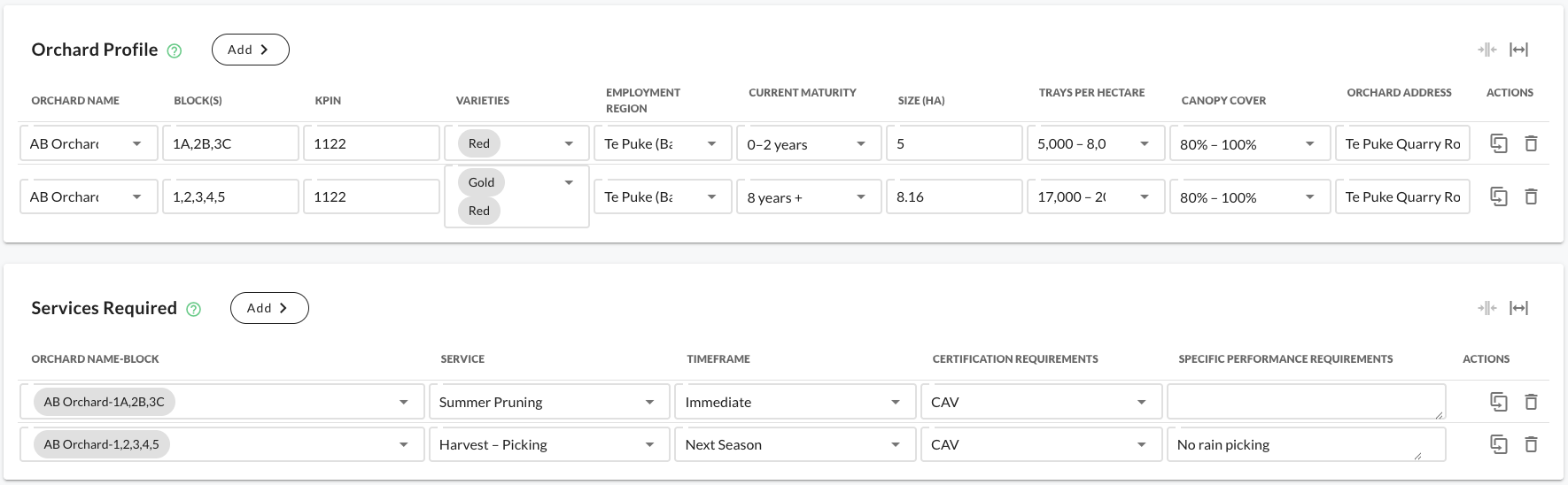
1. Orchard Profile
Purpose
The Orchard Profile defines the physical and operational characteristics of your orchard. It provides context for service planning, contract preparation, and regional labour forecasting.
| Field | Description | Example |
|---|---|---|
| Orchard Name | The official orchard name used for documentation and contracts. | Te Puke Orchards Ltd |
| Block(s) | Identifiers for blocks within the orchard. Use commas for multiple. | A1, A2, B3 |
| KPIN | Numeric identifier (1–4 digits) used for validation and compliance. | 1122 |
| Varieties | Kiwifruit varieties grown on the orchard. Multiple can be selected. | Gold, Red |
| Employment Region | Where the work takes place — supports logistics and compliance. | Te Puke (Bay of Plenty) |
| Current Maturity | Typical vine age range for the block(s). | 0–2 years |
| Size (ha) | Total orchard area in hectares. | 8.16 |
| Trays per Hectare | Typical yield per hectare — helps estimate resourcing. | 17,000 – 20,000 |
| Canopy Cover | Average canopy coverage across the block(s). | 80% – 100% |
| Orchard Address | Physical address of the orchard for compliance and navigation. | Te Puke Quarry Road, Te Puke, NZ |
note
You don’t need to know every figure perfectly — start with your best available data and refine later.
How to Add an Orchard Profile
- Click Add under the Orchard Profile section.
- Fill in all required fields:
- Select Orchard Name or add a new one.
- Enter Block(s) separated by commas.
- Input your KPIN (up to four digits).
- Choose Varieties (Gold, Green, or Red).
- Select your Employment Region (e.g. Te Puke, Gisborne, Nelson).
- Choose the Current Maturity range.
- Enter Size (ha).
- Select Trays per Hectare.
- Choose Canopy Cover range.
- Enter the Orchard Address.
- Click Done to save your orchard profile.
Once saved, your orchard blocks will appear in a table and can be linked to specific services.
Example: Completed Orchard Profile
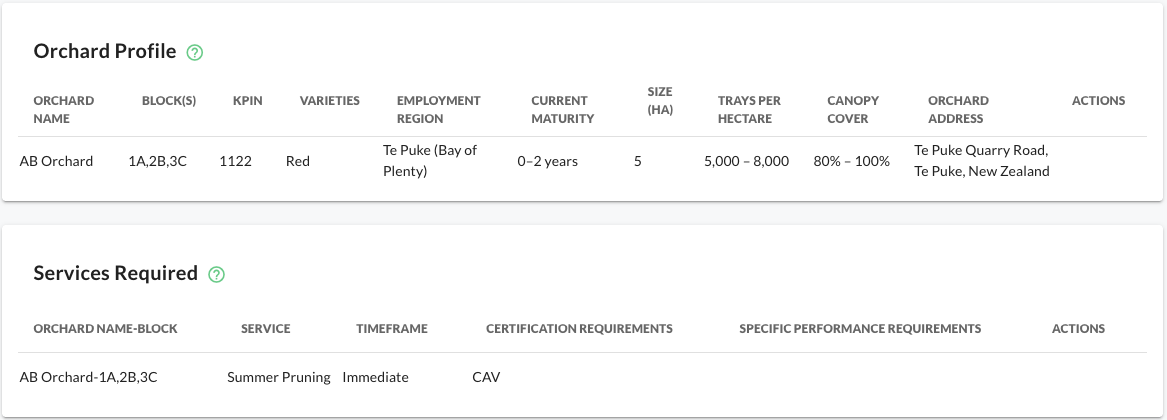
| Orchard Name | Block(s) | KPIN | Varieties | Employment Region | Current Maturity | Size (ha) | Trays per Hectare | Canopy Cover | Orchard Address |
|---|---|---|---|---|---|---|---|---|---|
| AB Orchard | 1A, 2B, 3C | 1122 | Red | Te Puke (Bay of Plenty) | 0–2 years | 5 | 5,000 – 8,000 | 80% – 100% | Te Puke Quarry Road, Te Puke, NZ |
| AB Orchard | 1,2,3,4,5 | 1122 | Gold, Red | Te Puke (Bay of Plenty) | 8 years + | 8.16 | 17,000 – 20,000 | 80% – 100% | Te Puke Quarry Road, Te Puke, NZ |
2. Services Required
Purpose
The Services Required section links your orchard and blocks to specific types of work, required timing, and compliance conditions. This ensures service providers understand exactly what, where, and when work needs to be done.
| Field | Description | Example |
|---|---|---|
| Orchard Name–Block | Links service requests to the orchard and block(s) defined above. | AB Orchard–1A,2B,3C |
| Service | The type of work required. Select from the list or enter your own. | Summer Pruning |
| Timeframe | When the service should start. | Immediate |
| Certification Requirements | Certifications required to perform the work. | CAV |
| Specific Performance Requirements | Additional notes on targets, safety, or equipment. |
note
Be as specific as possible in Service, Timeframe, and Performance Requirements — this helps contractors and teams plan resources accurately.
How to Add a Service
- Click Add under the Services Required section.
- Complete each field:
- Choose Orchard Name–Block (these come from your Orchard Profile table).
- Select or type a Service (e.g. Summer Pruning, Harvest – Picking).
- Choose a Timeframe (e.g. Immediate, Next Season).
- Add any required Certifications (e.g. CAV, GAP).
- Optionally, include Specific Performance Requirements (e.g. “No rain picking”, “All gold picked hourly”).
- Click Done to save your service entry.
Example: Completed Services Table
| Orchard Name–Block | Service | Timeframe | Certification Requirements | Specific Performance Requirements |
|---|---|---|---|---|
| AB Orchard–1A,2B,3C | Summer Pruning | Immediate | CAV | – |
| AB Orchard–1,2,3,4,5 | Harvest – Picking | Next Season | CAV | No rain picking |
Step 3. Validate and Review
Before finalising, double-check:
- Each Orchard Profile entry has complete details.
- Each Service Required links to an existing Orchard–Block.
- Certification and timing requirements align with the season plan.
If something doesn’t look right:
- Adjust each of fields as needed.
- Click Done to save.
note
Filling out the tables is easy — getting the facts right is the real value. Try and confirm accuracy using previewing.
Worked Example – Full Flow
- Add Orchard Profile
- Orchard Name:
AB Orchard - Blocks:
1A,2B,3C - KPIN:
1122 - Varieties:
Red - Employment Region:
Te Puke (Bay of Plenty) - Current Maturity:
0–2 years - Size (ha):
5 - Trays per Hectare:
5,000 – 8,000 - Canopy Cover:
80% – 100% - Orchard Address:
Te Puke Quarry Road, Te Puke, NZ
- Orchard Name:
Empty table
Add row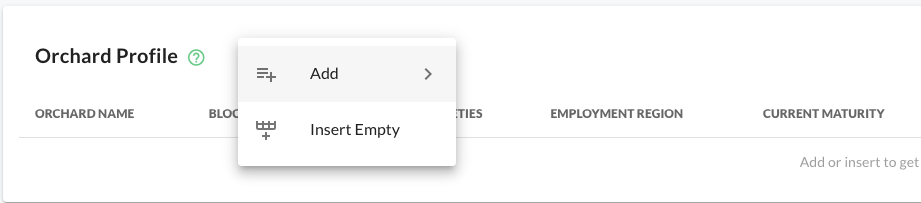
Enter details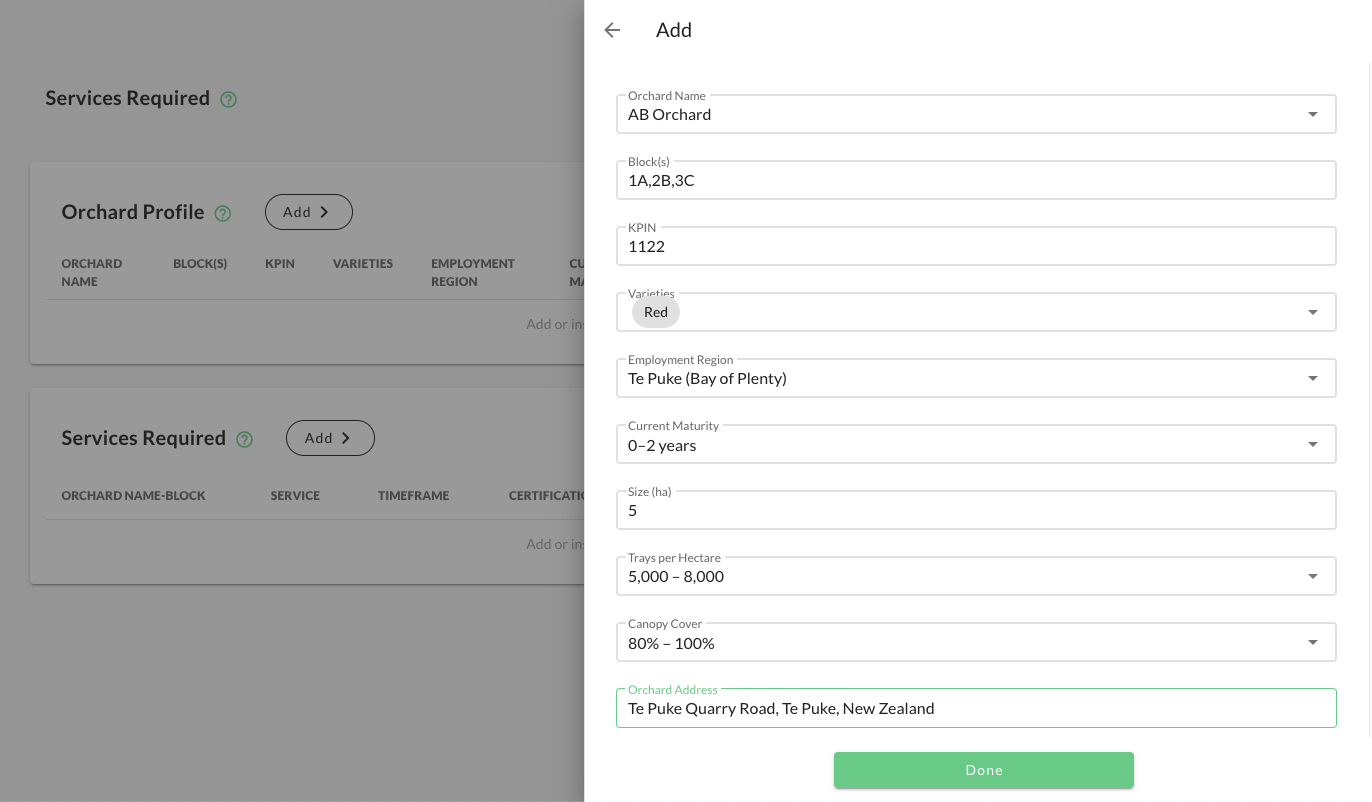
Completed row
- Add Services Required
- Orchard Name–Block:
AB Orchard–1A,2B,3C - Service:
Summer Pruning - Timeframe:
Immediate - Certification Requirements:
CAV - Specific Performance Requirements:
None
- Orchard Name–Block:
Empty table
Add row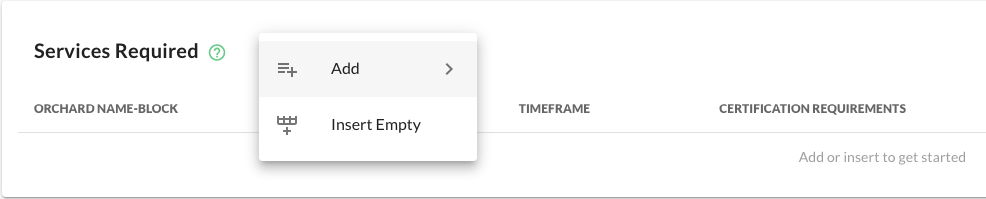
Enter details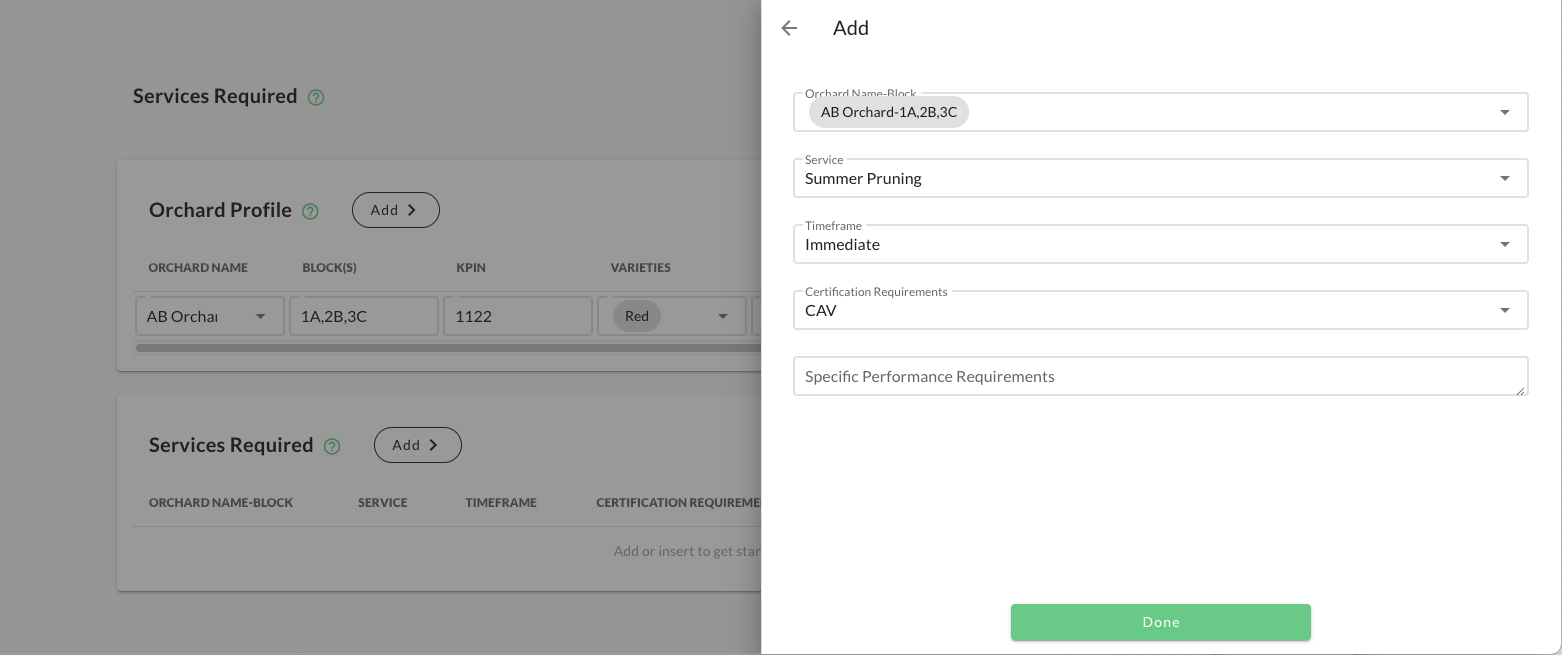
Completed row
- Result
- The orchard appears in the Orchard Profile table.
- The linked service appears in Services Required.
- Contractors can plan accordingly, and jobs referencing this orchard will automatically inherit its details.
Completed tables
Tips & Best Practices
✅ Keep your orchard profile current. Update it before the new season begins.
✅ Use consistent naming for blocks to avoid duplicate records.
✅ Check certification requirements before publishing services.
✅ Review before previewing — check the Edit/Preview toggle to confirm accuracy.